Accounts Payable Workflow Automation: From Invoice Intake to ERP Posting
How to automate invoice intake, validation, approvals, exception handling, and ERP posting with intelligent, controlled workflows.
Varixen Editorial Team
Enterprise Architecture & AI Advisory
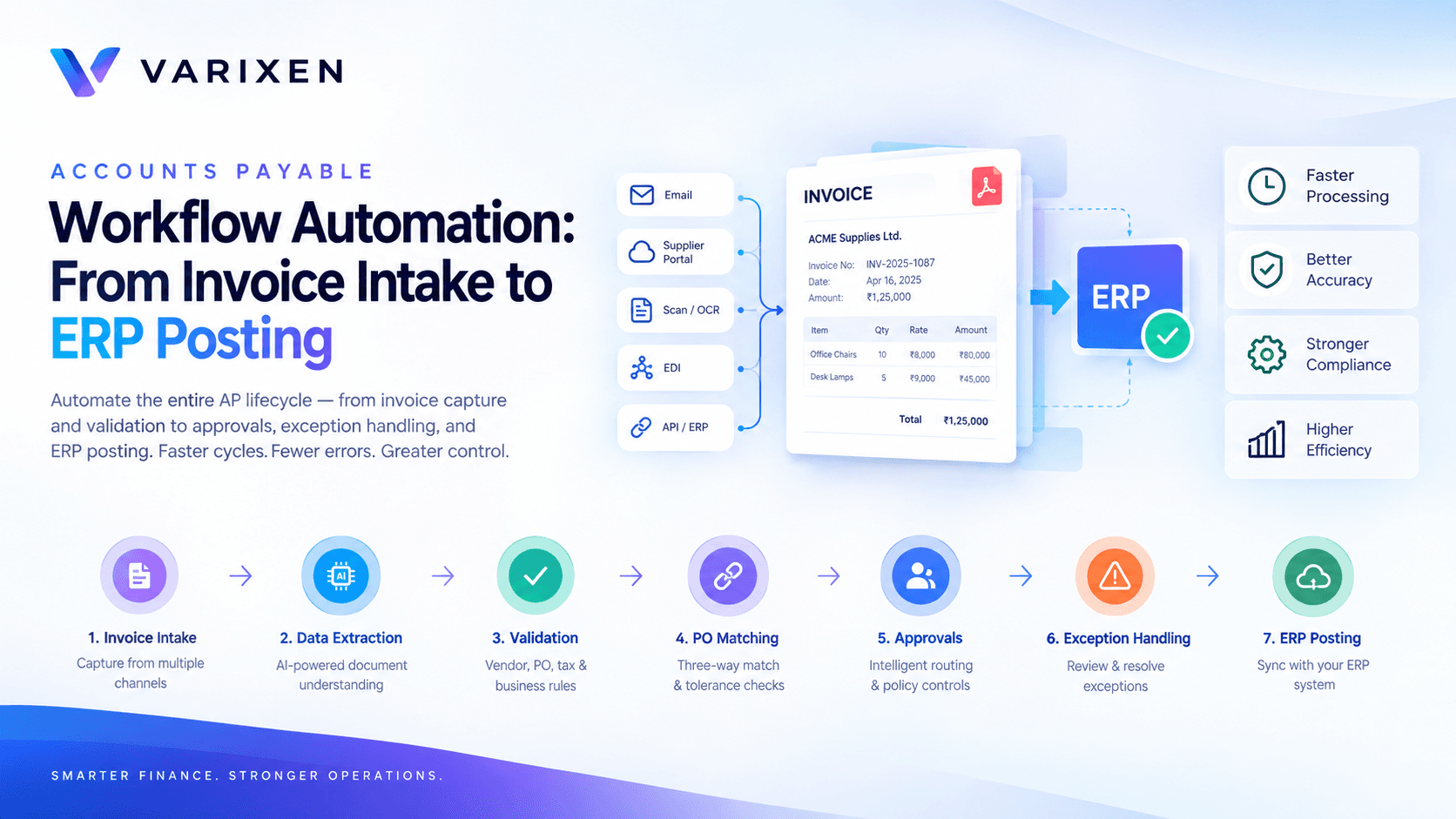
Accounts Payable Workflow Automation: From Invoice Intake to ERP Posting
Accounts payable teams rarely struggle with just one step of invoice processing. The real operational challenge is coordinating the entire journey—from receiving a vendor invoice to validating it, obtaining approvals, recording it in the ERP, and preparing it for payment.
An invoice may arrive through email, a supplier portal, a scanned document, or an EDI feed. Its data must be checked against vendor records, purchase orders, goods receipts, tax rules, approval policies, and accounting requirements. When these activities depend on disconnected systems and manual handoffs, even a relatively simple invoice can become a time-consuming operational task.
Accounts payable workflow automation addresses this problem by connecting invoice processing activities into a controlled, traceable, and increasingly intelligent workflow.
Instead of automating invoice data entry alone, organizations can automate the decisions, validations, routing, and system interactions that move an invoice through the AP lifecycle.
In this guide, we explore how an enterprise AP automation workflow works, the technologies behind it, the role of AI and business rules, and how organizations can implement automation without compromising financial controls.
What Is Accounts Payable Workflow Automation?
Accounts payable (AP) workflow automation is the use of software, integrations, business rules, and AI-driven capabilities to automate activities involved in receiving, validating, approving, recording, and preparing supplier invoices for payment.
A comprehensive AP workflow may include:
- Invoice intake from email, portals, scanned documents, and other channels.
- Document classification and invoice data extraction.
- Vendor identification and master-data validation.
- Duplicate invoice detection.
- Purchase order (PO) and goods receipt matching.
- Tax, amount, and accounting validation.
- Automated approval routing.
- Exception identification and resolution.
- ERP posting and payment-readiness checks.
- Audit logging, reporting, and operational monitoring.
The objective is not simply to process invoices faster. It is to reduce repetitive work while making invoice processing more consistent, auditable, and scalable.
For enterprises exploring this approach, Varixen's Accounts Payable and Finance AI solutions provide a starting point for understanding how intelligent invoice processing, reconciliation, and finance workflow automation can be integrated into enterprise operations.
Why Traditional AP Workflows Become Operational Bottlenecks
Many finance teams already use an ERP or accounting platform. However, having an ERP does not necessarily mean that the entire invoice lifecycle is automated.
The gaps often exist between systems, teams, and decision points.
1. Fragmented Invoice Intake
Invoices may arrive through multiple channels, including shared mailboxes, supplier portals, paper documents, and electronic data feeds.
When these channels are not connected to a common intake process, AP teams must manually identify, download, categorize, and forward invoices.
This creates inconsistent processing and makes it difficult to track where an invoice is in the workflow.
2. Repetitive Data Entry and Validation
Invoice numbers, supplier details, tax identifiers, line items, quantities, payment terms, and totals may need to be entered or verified manually.
Even when OCR is available, extracted values still require validation against vendor records, purchase orders, and accounting policies.
The challenge is not merely extracting information—it is determining whether that information is valid for the transaction.
3. Manual Purchase Order Matching
For PO-backed invoices, finance teams may need to compare invoice details against purchase orders and goods receipts.
Differences in quantity, unit price, freight, tax, or receipt status can create delays.
Without automated matching rules, AP personnel must repeatedly inspect documents and coordinate with procurement or receiving teams.
4. Approval Delays
Invoices may be routed through email chains or manually assigned to managers.
Approvals can be delayed when the responsible approver is unavailable, the cost center is incorrect, or the invoice exceeds a predefined authority limit.
A workflow automation system can route invoices according to configured policies and maintain visibility into pending approvals.
5. Limited Exception Visibility
When invoices fail validation, they often move into informal queues or remain in email conversations.
Without structured exception tracking, finance leaders may struggle to identify recurring causes of delay, supplier issues, or process bottlenecks.
A well-designed AP workflow treats exceptions as managed work items rather than isolated problems.
The End-to-End Accounts Payable Automation Workflow
A practical AP automation system can be organized into a series of connected stages.
Stage 1: Invoice Intake and Registration
The workflow begins when an invoice enters the organization.
Common intake channels include:
- Accounts payable email inboxes.
- Supplier portals.
- Scanned paper invoices.
- ERP or accounting system uploads.
- EDI and structured invoice feeds.
- API-based supplier integrations.
Each invoice should receive a unique processing record containing its source, received timestamp, document reference, and current workflow status.
The intake layer should also identify unreadable files, unsupported formats, missing attachments, and repeated submissions.
Design consideration: Preserve the original invoice and its source metadata. The workflow should maintain a traceable relationship between the source document and every downstream processing action.
Stage 2: Document Classification and Data Extraction
After intake, the system identifies the document type and extracts relevant invoice fields.
Typical fields include:
| Data Group | Examples |
|---|---|
| Supplier information | Vendor name, vendor ID, tax identifier |
| Invoice details | Invoice number, invoice date, due date |
| Financial values | Subtotal, tax, total amount, currency |
| Purchase information | PO number, item descriptions, quantities |
| Payment information | Payment terms, bank details, remittance references |
| Accounting information | GL account, cost center, department |
AI-powered OCR and document understanding can help process varied layouts, scanned documents, and line-item tables.
However, extracted values should not automatically be treated as verified financial data.
For a deeper technical explanation of this layer, read AI Invoice Data Extraction: Architecture, Accuracy & Human-in-the-Loop Design.
Stage 3: Vendor Identification and Master-Data Validation
The extracted supplier information is compared against the organization's approved vendor master.
Validation may include:
- Matching the supplier to an existing vendor record.
- Verifying tax identifiers and other required fields.
- Checking whether the vendor is active.
- Validating invoice currency and payment terms.
- Identifying discrepancies in supplier information.
Vendor matching should use a combination of identifiers and controlled matching logic rather than relying exclusively on fuzzy text similarity.
For example, two suppliers may have similar names but represent different legal entities.
If the system cannot establish a reliable vendor match, the invoice should be routed for review instead of being assigned to a potentially incorrect supplier.
Changes to sensitive vendor master data—especially payment-related information—should follow separate authorization and verification controls.
Stage 4: Duplicate Invoice Detection
Duplicate invoices can result from repeated email submissions, supplier resends, manual uploads, or inconsistent document references.
A duplicate detection layer can compare multiple attributes, including:
- Vendor identity.
- Invoice number.
- Invoice date.
- Invoice amount and currency.
- PO reference.
- Existing invoice records in the ERP.
A deterministic match may identify an obvious duplicate. More flexible matching can flag potential duplicates where formatting or reference values differ.
The system should distinguish between a confirmed duplicate and a possible duplicate.
A potential match should normally trigger a review or a controlled hold—not an automatic rejection without sufficient evidence.
Stage 5: Business Validation and PO Matching
This is one of the most important stages in the AP workflow.
An invoice may contain correctly extracted data but still be inconsistent with the underlying transaction.
For PO-backed invoices, the system can compare invoice information against:
- 1Purchase Order: What was ordered, at what price, and under which terms?
- 2Goods Receipt: What was received and accepted?
- 3Supplier Invoice: What is the supplier requesting payment for?
This is commonly referred to as three-way matching.
Example: Three-Way Matching
Consider an illustrative transaction:
| Field | Purchase Order | Goods Receipt | Invoice |
|---|---|---|---|
| Quantity | 100 | 100 | 100 |
| Unit price | ₹500 | — | ₹500 |
| Line amount | ₹50,000 | Received | ₹50,000 |
The invoice matches the PO price and the received quantity, assuming applicable tax, freight, and other rules also pass.
Now consider an invoice for 110 units when only 100 units have been received.
The system should identify the discrepancy and route the invoice for resolution according to company policy.
It should not silently approve the invoice simply because the extracted total appears mathematically correct.
Configurable Matching Rules
An enterprise workflow may support:
- Exact PO and invoice reference matching.
- Quantity tolerance thresholds.
- Unit-price tolerance thresholds.
- Tax and freight validation.
- Partial delivery handling.
- Partial invoice handling.
- Service-based invoice validation.
- Non-PO invoice routing.
Matching tolerances must be configured according to the organization's procurement and finance policies. They should not be treated as universal values.
For more complex matching scenarios, organizations may extend the workflow with enterprise automation and ERP integration capabilities.
Stage 6: GL Coding and Accounting Validation
Once the invoice passes the applicable transaction checks, the system can assign or recommend accounting classifications.
These may include:
- General ledger account.
- Cost center.
- Department.
- Project code.
- Tax treatment.
- Legal entity.
AI can assist with coding by using historical accounting patterns, vendor context, invoice descriptions, and approved classification rules.
For example, recurring invoices from a software vendor may be associated with a particular expense category. However, a new purchase from the same vendor may require a different classification.
Therefore, accounting automation should combine model-based recommendations with deterministic rules, historical context, and approval policies.
Low-confidence or policy-sensitive classifications should be sent for review.
Stage 7: Intelligent Approval Routing
Once validation is complete, the invoice moves into the appropriate approval workflow.
Approval routing may depend on:
- Invoice amount.
- Department or cost center.
- Legal entity.
- PO or non-PO status.
- Expense category.
- Project ownership.
- Delegation-of-authority policies.
For example, a non-PO invoice above a configured threshold may require department-head approval and finance review.
A PO-backed invoice that passes matching rules may follow a different approval path, depending on the organization's controls.
The workflow should support approver delegation, reminders, escalation rules, and clear approval records.
Important: Automated approval routing is not the same as unrestricted payment authorization. Payment release should remain governed by the organization's financial controls and authorized signatories.
Stage 8: Exception Handling and Human-in-the-Loop Review
Not every invoice should be processed straight through.
A production-grade workflow must identify when it cannot safely proceed.
Common exceptions include:
- Unrecognized suppliers.
- Missing PO references.
- Duplicate invoice candidates.
- Quantity or price mismatches.
- Unreadable documents.
- Missing tax information.
- Uncertain GL coding.
- Approval policy violations.
- ERP integration failures.
Each exception should have a defined reason code, owner, priority, status, and resolution path.
Human reviewers should be able to inspect the original invoice, extracted fields, validation results, and relevant PO or ERP information in one place.
When a reviewer corrects a field, the system should retain the original value, corrected value, reviewer identity, timestamp, and reason where required.
This creates an auditable process while allowing the automation system to handle routine invoices independently.
Stage 9: ERP Posting and Payment Readiness
After all required validations and approvals are complete, the workflow can create or update the invoice record in the ERP.
The integration layer should handle:
- Vendor and legal-entity mapping.
- Invoice header and line-item mapping.
- Tax and currency fields.
- GL and cost-center assignments.
- PO references.
- Approval status.
- ERP-generated invoice identifiers.
The system must also account for API timeouts, duplicate requests, rate limits, and partial failures.
For example, if an ERP successfully creates an invoice but the response is lost, blindly retrying the request may create a duplicate.
A reliable integration should use idempotency controls where supported, reconciliation checks, and controlled retry logic.
After successful posting, the workflow should store the ERP reference and update the invoice's processing status.
The invoice can then proceed through the organization's existing payment scheduling and payment authorization process.
Stage 10: Monitoring, Reconciliation, and Audit
Automation does not end when an invoice is posted.
Finance teams need visibility into the health and performance of the complete workflow.
Useful operational metrics include:
- Invoice processing cycle time.
- Straight-through processing rate.
- Exception rate.
- First-pass validation rate.
- Approval turnaround time.
- Duplicate invoice detection rate.
- ERP posting failure rate.
- Manual intervention hours.
- Cost per processed invoice.
These metrics should be defined consistently, with clear denominators and measurement periods.
For example, straight-through processing rate should specify whether it measures invoices completed without manual intervention across the entire workflow or only those passing selected stages.
Reference Architecture for AP Workflow Automation
A scalable AP automation platform can be organized into the following logical layers:
| Layer | Responsibility |
|---|---|
| Intake | Receive invoices from email, portals, ERP uploads, and structured feeds |
| Document intelligence | Classify invoices and extract structured fields |
| Validation engine | Validate vendor, invoice, tax, PO, and accounting information |
| Workflow orchestration | Manage state transitions, approvals, retries, and exceptions |
| Human review | Provide controlled review and correction interfaces |
| Integration layer | Connect ERP, procurement, vendor master, and finance systems |
| Observability and audit | Track events, processing outcomes, exceptions, and system health |
The layers should be connected through explicit interfaces and well-defined data contracts.
A workflow orchestration engine manages the invoice's state, while specialized services handle extraction, matching, validation, and integrations.
For instance, an invoice may transition through states such as:
RECEIVED → EXTRACTED → VALIDATED → MATCHED → APPROVED → ERP_POSTED
An invoice requiring manual intervention might transition into:
VALIDATION_EXCEPTION → UNDER_REVIEW → RESOLVED → VALIDATED
These states are illustrative. The actual workflow should reflect the organization's policies and ERP requirements.
For a deeper look at document-processing architecture, refer to AI Invoice Processing Architecture.
Where AI Fits—and Where Deterministic Rules Matter
A common misconception is that an AI model should make every decision in an AP workflow.
In practice, the system should assign responsibilities according to the type of decision being made.
| Task | Suitable Approach |
|---|---|
| Extracting fields from varied invoice layouts | AI-powered OCR and document understanding |
| Classifying document types | ML or rules-based classification |
| Matching supplier records | Deterministic identifiers with controlled fuzzy matching |
| Validating invoice totals | Deterministic arithmetic and business rules |
| Comparing invoice values with PO records | Rules-based matching with configured tolerances |
| Recommending GL codes | AI-assisted classification with validation |
| Routing approvals | Deterministic policy and workflow rules |
| Resolving ambiguous discrepancies | Human review with contextual evidence |
AI is valuable when the input is unstructured, variable, or ambiguous.
Deterministic logic is essential when a decision must satisfy explicit financial policies.
The objective is not to maximize the number of AI-driven steps. It is to build a workflow in which each component has a clear responsibility and a defined failure path.
Measuring the Business Impact of AP Automation
The value of AP automation should be measured against a documented baseline.
Before implementation, finance leaders should record current invoice volumes, processing times, manual touchpoints, exception categories, and approval delays.
The following metrics can help evaluate progress:
| KPI | What It Measures |
|---|---|
| Cost per invoice | Total AP processing cost divided by invoices processed |
| Invoice cycle time | Elapsed time between defined intake and completion milestones |
| Straight-through processing rate | Share of invoices completed without manual intervention |
| First-pass match rate | Share of applicable invoices passing matching on the first attempt |
| Exception rate | Share of invoices requiring exception handling |
| Approval turnaround time | Time taken for required approvals |
| ERP posting success rate | Share of posting attempts completed successfully |
| Duplicate prevention rate | Confirmed duplicate submissions prevented from progressing |
Targets should be based on actual process complexity, invoice mix, system maturity, and the quality of the available data.
For example, an organization processing standardized PO-backed invoices may achieve a different automation rate from one managing complex non-PO invoices across multiple legal entities.
Avoid evaluating success only through extraction accuracy or the number of invoices processed. A system that extracts data accurately but creates incorrect ERP records or routes invoices to the wrong approvers is not delivering reliable automation.
Security and Financial Controls in Automated AP Workflows
Accounts payable systems handle sensitive financial information and can directly influence payment operations.
Automation must therefore preserve the organization's existing control environment.
Important safeguards include:
- Role-based access to invoices and financial records.
- Encryption in transit and at rest.
- Secure credential and API-key management.
- Separation of duties between invoice processing, approval, and payment release.
- Approval thresholds and delegated authority.
- Audit logs for changes, approvals, and system actions.
- Controlled access to vendor master data.
- Duplicate prevention and reconciliation mechanisms.
- Monitoring of integration failures and unusual activity.
- Defined retention and data-handling policies.
Where external AI services are used, organizations should assess data retention, processing location, access controls, contractual terms, and whether sensitive invoice data is used for model training.
Security requirements should be defined during architecture and vendor assessment—not added after the workflow is deployed.
How to Implement AP Workflow Automation: A Practical Roadmap
A phased implementation helps organizations reduce operational disruption and validate the automation before expanding it.
Phase 1: Discover and Map the Existing Workflow
Document invoice sources, processing steps, approval policies, ERP dependencies, exception categories, and manual work.
Identify the invoice types and departments responsible for the greatest operational friction.
Phase 2: Select a Defined Automation Scope
Start with a bounded workflow, such as recurring PO-backed invoices from a limited set of suppliers.
Define the success metrics, exception rules, data requirements, and integration boundaries before development.
Phase 3: Build the Intake, Extraction, and Validation Pipeline
Connect the invoice sources, implement document extraction, and establish validation against vendor and procurement records.
Test with representative invoices, including poor-quality scans, multi-page documents, credit notes, and exception cases.
Phase 4: Integrate Approvals and ERP Posting
Implement workflow orchestration, approval routing, ERP connectivity, and audit logging.
Test failure scenarios such as unavailable APIs, duplicate submissions, invalid vendor records, and incomplete approvals.
Phase 5: Pilot, Measure, and Expand
Run the workflow against a controlled invoice population.
Compare results against the baseline, review exceptions, and validate that financial controls remain effective.
Expand to additional invoice types and departments only after the initial workflow demonstrates reliable performance.
Organizations requiring custom workflow orchestration, ERP middleware, document automation, or human-review interfaces can explore Varixen's Enterprise Automation & Workflow Integration services.
Frequently Asked Questions
What is the difference between invoice processing automation and AP workflow automation?
Invoice processing automation often focuses on receiving invoices, extracting data, and validating invoice information.
AP workflow automation covers a broader lifecycle, including invoice intake, validation, matching, approval routing, exception handling, ERP posting, and operational monitoring.
Invoice processing can be one component of a complete AP workflow.
Can AP automation work with an existing ERP?
Yes. AP automation can be integrated with an existing ERP through supported APIs, middleware, webhooks, file-based interfaces, or other approved integration mechanisms.
The integration approach depends on the ERP's capabilities, data model, security requirements, and the organization's existing architecture.
Does every invoice need human approval?
No. Organizations can define approval and review requirements according to invoice type, amount, PO status, risk, and internal financial policies.
Some invoices may proceed through configured automated controls, while others require explicit human approval or exception review.
Can AI completely eliminate manual AP processing?
Not reliably across every invoice type and business scenario.
AI can reduce repetitive work, but ambiguous documents, policy exceptions, unmatched transactions, and sensitive financial decisions may still require human intervention.
A practical objective is controlled automation with measurable reductions in manual work—not the assumption that every invoice can be processed without review.
How should organizations measure AP automation success?
Measure end-to-end cycle time, cost per invoice, straight-through processing rate, exception rate, approval turnaround, ERP posting success, and manual intervention.
The baseline and calculation method should remain consistent so that improvements reflect actual operational outcomes.
Is AP automation suitable for non-PO invoices?
Yes, but non-PO invoices often require additional validation and approval logic because they may not have a purchase order or goods receipt to match against.
The workflow may need stronger GL coding controls, budget checks, cost-center validation, and approval routing.
Conclusion: Build an AP Workflow, Not Just an OCR Pipeline
Accounts payable automation delivers its full operational value when invoice intelligence is connected to business rules, approvals, exception management, and ERP execution.
OCR and AI can transform unstructured invoices into usable data. But the workflow surrounding that data determines whether the organization can process invoices reliably, preserve financial controls, and scale without proportionally increasing manual effort.
For enterprise finance teams, the next step is to identify where invoices slow down, which decisions can be safely automated, and how those decisions can be integrated into the existing finance environment.
At Varixen, we approach AP automation as an end-to-end enterprise workflow engineering challenge—connecting document intelligence, business validation, approval orchestration, and ERP integration into a controlled operating process.
Explore Varixen's Accounts Payable and Finance AI capabilities to understand how intelligent invoice processing and finance workflow automation can support your organization's next stage of operational transformation.
If your finance team is evaluating AP automation, start with the workflow—not just the invoice scanner.