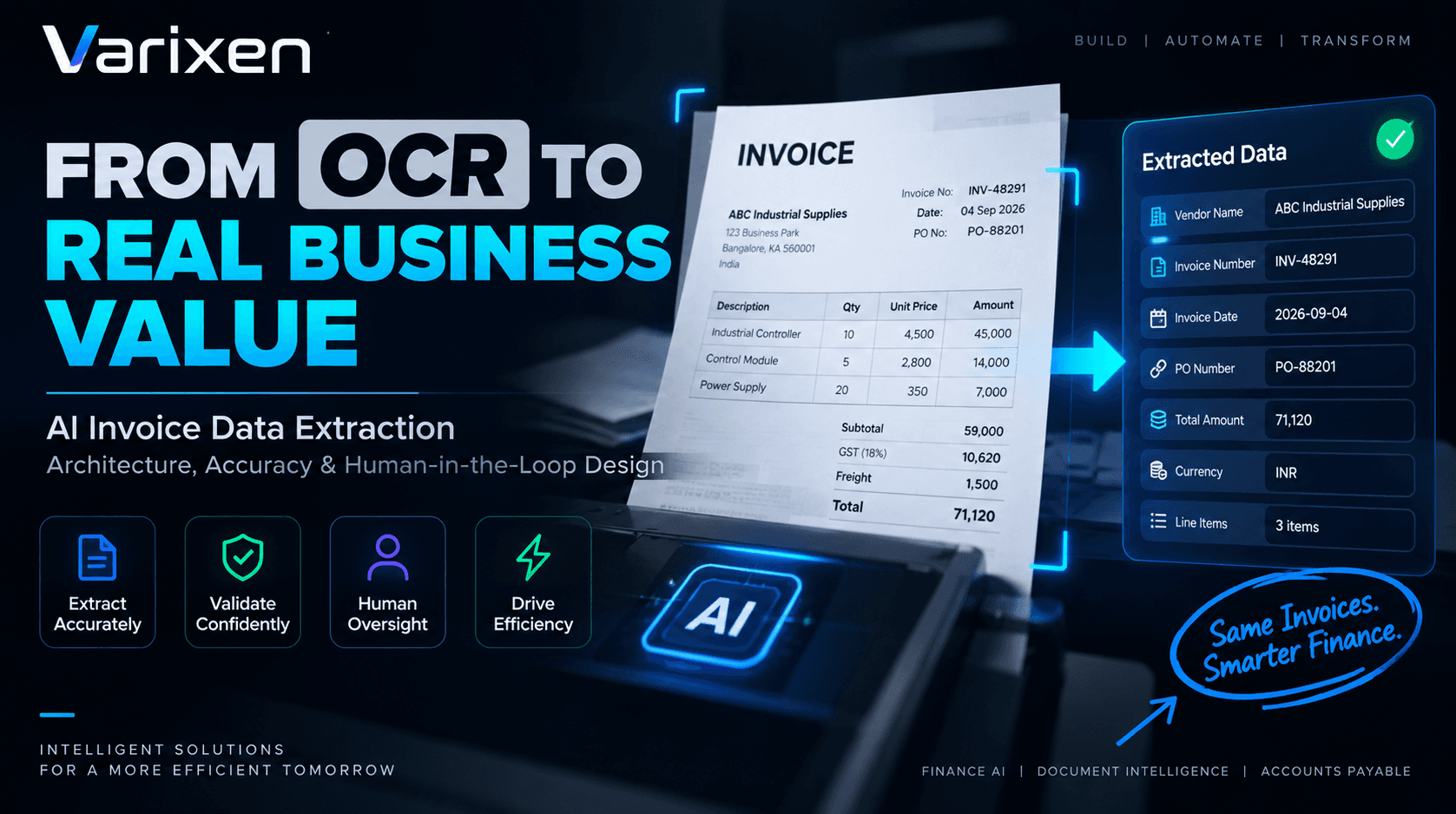
AI Invoice Data Extraction: Architecture, Accuracy & Human-in-the-Loop Design
From OCR to reliable, validated financial data with AI-powered extraction and human oversight.
Varixen Editorial Team
Enterprise Architecture & AI Advisory
Executive Summary
Invoice processing is often introduced as an OCR problem.
A document arrives. OCR reads the characters. The system extracts an invoice number, vendor name, amount, tax, and line items.
That approach can work for simple documents.
Enterprise invoices are rarely simple.
Invoices can contain different layouts, multi-page tables, handwritten annotations, scanned images, inconsistent terminology, tax structures, purchase-order references, discounts, freight charges, and vendor-specific formatting.
More importantly, extracting a value does not mean that the value is correct.
A production-grade AI invoice data extraction system therefore needs to answer several questions:
- What type of document is this?
- Where is each financial field?
- What does each field mean?
- How confident is the extraction?
- Which page and region produced the value?
- Do the line items add up?
- Does the vendor exist?
- Does the purchase order match?
- Does the invoice violate any business rules?
- Should the transaction be processed automatically or reviewed by a human?
The architecture should therefore look beyond:
Invoice → OCR → JSONand toward:
Invoice
   ↓
Document Ingestion
   ↓
Classification
   ↓
OCR / Vision Processing
   ↓
Layout Understanding
   ↓
Semantic Extraction
   ↓
Confidence & Provenance
   ↓
Financial Validation
   ↓
PO / Receipt Matching
   ↓
Risk Evaluation
   ↓
Human Review or Automation
   ↓
ERP / Finance Workflow
This distinction is central to enterprise AI invoice processing.
Varixen's Finance & Accounting AI architecture similarly positions invoice extraction as part of a broader workflow involving multimodal document processing, 3-way reconciliation, GL automation, exception handling, and ERP synchronization. ([Varixen][1])
Table of Contents
- 1
- 2
- 3
- 4
- 5
- 6
- 7
- 8
- 9
- 10
- 11
- 12
- 13
- 14
- 15
- 16
- 17
- 18
- 19
- 20
- 21
1. Why Invoice Data Extraction Is Harder Than OCR
An invoice is not simply a page of text.
It is a structured financial document represented visually.
Consider:
INVOICEVendor: ABC Industrial Supplies Invoice #: INV-48291 Invoice Date: 04/09/2026 PO #: PO-88201
--------------------------------------------------------- Item Qty Price Amount --------------------------------------------------------- Industrial Controller 10 ₹4,500 ₹45,000 Control Module 5 ₹2,800 ₹14,000 ---------------------------------------------------------
Subtotal ₹59,000
GST ₹10,620
Freight ₹1,500
Total ₹71,120
`
A human immediately understands the relationships between these elements.
A basic OCR engine may produce a text stream such as:
ABC Industrial Supplies
INV-48291
04/09/2026
PO-88201
Industrial Controller
10
4500
45000
Control Module
5
2800
14000
GST
10620
Freight
1500
Total
71120
The text exists.
But the financial structure has been lost.
The system still needs to determine:
4500 → Unit Price
10 → Quantity
45000 → Line Total
10620 → Tax
71120 → Invoice Total
That is the difference between OCR and intelligent document understanding.
2. OCR vs. Intelligent Invoice Data Extraction
Traditional OCR primarily answers:
"What characters are visible in this document?"
AI-powered invoice extraction needs to answer:
"What does this information represent, and how does it relate to the rest of the transaction?"
| Capability | Traditional OCR | AI Invoice Extraction |
|---|---|---|
| Character recognition | Yes | Yes |
| Document classification | Limited | Yes |
| Layout understanding | Limited | Yes |
| Semantic field identification | Limited | Yes |
| Complex table extraction | Often difficult | Context-aware |
| Multi-page relationships | Limited | Supported through workflow |
| Confidence scoring | Varies | Designed into extraction |
| Financial validation | No | Yes |
| PO matching | No | Yes |
| Human review routing | External | Integrated |
| ERP integration | Usually external | Workflow-integrated |
| Audit provenance | Limited | Can be captured end-to-end |
The goal is therefore not to eliminate OCR.
OCR remains an important component.
The goal is to place OCR and vision processing inside a larger document intelligence pipeline.
Varixen's multimodal AI capability is designed around processing multiple data types and complex documents, including charts, tables, diagrams, and body text. ([Varixen][2])
3. What Data Should an AI Invoice Extractor Capture?
A robust invoice extraction schema should reflect the actual downstream accounting workflow.
Header Information
Typical fields include:
Invoice Number
Invoice Date
Due Date
Invoice Type
Currency
Purchase Order Number
Payment Terms
Reference Number
Vendor Information
Vendor Name
Vendor ID
Tax Registration Number
Billing Address
Remittance Address
Banking Information
Customer Information
Customer Name
Customer ID
Billing Entity
Shipping Entity
Tax Registration Number
Line Items
Each line should become a structured object:
{
  "description": "Industrial Controller",
  "quantity": 10,
  "unitOfMeasure": "EA",
  "unitPrice": 4500,
  "taxRate": 18,
  "lineTotal": 45000
}
Financial Totals
Subtotal
Discount
Freight
Tax
Withholding
Round-off
Total
Amount Due
Metadata
A production system should additionally retain:
Document ID
Source Channel
Upload Timestamp
Page Count
Extraction Model
Model Version
Confidence
Processing Status
Reviewer
Review Timestamp
The extracted financial record should therefore be treated as a structured transaction candidate, not simply as OCR output.
4. Reference Architecture for AI Invoice Data Extraction
A production architecture can be organized into the following layers:
INVOICE SOURCES
                         │
        ┌────────────────┼────────────────┐
        │                │                │
      Email           Portal            API
        │                │                │
      Scanner           EDI             SFTP
        └────────────────┼────────────────┘
                         ↓
                ┌─────────────────┐
                │ Ingestion Layer │
                └────────┬────────┘
                         ↓
                ┌─────────────────┐
                │ Classification  │
                └────────┬────────┘
                         ↓
          ┌────────────────────────────┐
          │ Document Intelligence     │
          │                            │
          │ OCR + Vision + Layout     │
          │ Understanding             │
          └──────────────┬─────────────┘
                         ↓
                ┌─────────────────┐
                │ Data Extraction │
                └────────┬────────┘
                         ↓
              ┌──────────────────────┐
              │ Confidence +         │
              │ Provenance Layer      │
              └──────────┬───────────┘
                         ↓
              ┌──────────────────────┐
              │ Validation Engine    │
              └──────────┬───────────┘
                         ↓
              ┌──────────────────────┐
              │ Matching / Risk      │
              └──────────┬───────────┘
                         ↓
                ┌─────────────────┐
                │ Decision Layer  │
                └───────┬─────────┘
                        │
             ┌──────────┴──────────┐
             ↓                     ↓
       Auto Processing        Human Review
             │                     │
             └──────────┬──────────┘
                        ↓
                 ERP / Accounting
The architecture should also have cross-cutting capabilities:
Security
Audit
Observability
MLOps
Data Governance
Access Control
Cost Monitoring
This is why invoice extraction should be treated as an enterprise AI engineering problem, not merely an OCR implementation.
5. Stage 1: Document Ingestion
The first challenge is getting invoices into the system reliably.
Invoices can originate from:
- Email attachments
- Supplier portals
- EDI
- Scanners
- Cloud storage
- APIs
- Procurement platforms
- Enterprise document repositories
The ingestion layer should normalize these sources.
Email
Portal
Scanner
EDI
API
SFTP
   ↓
Ingestion Gateway
   ↓
Normalized Document
Validate Before Processing
Before sending a document to an AI model, the system should validate:
- File type
- File size
- Page count
- Encryption status
- Malware status
- Document readability
- Source metadata
Generate a Transaction ID
Every document should receive an immutable internal identifier.
For example:
INV-TXN-2026-00048291This identifier should remain associated with the transaction throughout:
Ingestion
→ Extraction
→ Validation
→ Review
→ Matching
→ ERP Posting
Deduplicate Early
Duplicate detection should happen as early as possible.
Useful signals can include:
Vendor
Invoice Number
Invoice Date
Amount
Currency
PO Number
Document Hash
This is especially important when the same invoice can enter through multiple channels.
6. Stage 2: Document Classification
Not every document arriving in an AP inbox is an invoice.
It may be:
- Credit note
- Debit note
- Purchase order
- Receipt
- Statement
- Delivery document
- Tax document
- Supporting attachment
The system should classify the document before applying the invoice extraction schema.
For example:
Incoming Document
       ↓
Document Classifier
       │
       ├── Invoice
       ├── Credit Note
       ├── Purchase Order
       ├── Receipt
       ├── Statement
       └── Unknown
Classification errors at this stage can contaminate every downstream process.
Therefore, classification confidence should also be captured.
Document Type: Invoice
Confidence: 0.97
If confidence is below a configured threshold:
→ Human Reviewrather than blindly continuing.
7. Stage 3: Layout-Aware Document Understanding
This is where modern AI approaches become particularly valuable.
Invoices contain spatial relationships.
For example:
Invoice Number
                           ↓
                ┌─────────────────────┐
                │      INV-48291      │
                └─────────────────────┘
A system should understand that the value is associated with the nearby label.
The same applies to tables.
The system needs to understand column relationships rather than simply reading values sequentially.
This becomes even more difficult when:
- Tables span pages
- Columns are uneven
- Borders are missing
- Text wraps
- Fonts vary
- Scans are skewed
- Documents contain stamps or annotations
A multimodal approach can combine:
Text
+
Visual Layout
+
Spatial Relationships
+
Document Semantics
instead of relying solely on character recognition.
Varixen specifically positions multimodal document intelligence for parsing complex tables and unstructured PDF content by combining visual and textual information. ([Varixen][2])
8. Stage 4: Semantic Field Extraction
Once the document structure is understood, the extraction engine maps document elements into a predefined schema.
Consider:
Invoice No.
INV-48291
The system should produce:
{
  "invoiceNumber": "INV-48291"
}
Similarly:
Invoice Date: 04/09/2026becomes:
{
  "invoiceDate": "2026-09-04"
}
But enterprise extraction needs more than field recognition.
Normalization
The same concept can appear in different formats:
04/09/2026
09-04-2026
2026-09-04
04 Sep 2026
The extraction pipeline should normalize these into a canonical representation.
For example:
2026-09-04Currency Normalization
Invoices may use:
$
USD
US$
₹
INR
€
EUR
The extraction layer should map these representations to a consistent currency code.
Vendor Entity Resolution
The invoice may contain:
ABC Industrial Supplies Pvt. Ltd.while the ERP master may contain:
ABC Industrial SuppliesThe extraction layer should not automatically assume these are separate vendors.
Entity resolution can combine:
Vendor Name
+
Tax ID
+
Address
+
Vendor Master
to identify the correct enterprise entity.
9. Stage 5: Line-Item Extraction
Line-item extraction is often one of the hardest parts of invoice processing.
A simple invoice might contain:
Description Qty Price TotalController 10 4500 45000
Module 5 2800 14000
Cable 20 350 7000
`
But real-world documents can introduce:
- Multi-line descriptions
- Product codes
- Discounts
- Tax columns
- Unit conversions
- Nested rows
- Page continuations
- Subtotals
- Group headers
The extraction system needs to preserve relationships.
For example:
{
  "lineItems": [
    {
      "sku": "CTRL-100",
      "description": "Industrial Controller",
      "quantity": 10,
      "unitOfMeasure": "EA",
      "unitPrice": 4500,
      "lineTotal": 45000
    },
    {
      "sku": "MOD-220",
      "description": "Control Module",
      "quantity": 5,
      "unitOfMeasure": "EA",
      "unitPrice": 2800,
      "lineTotal": 14000
    }
  ]
}
Why Line-Item Accuracy Matters
A correct invoice total does not guarantee correct line-item extraction.
For example:
Invoice Total = ₹59,000may be correct while the system incorrectly assigns:
Quantity = 100
Unit Price = ₹590
instead of:
Quantity = 10
Unit Price = ₹5,900
This is why extraction must be validated against accounting logic and downstream records.
10. Stage 6: Confidence Scoring and Provenance
One of the biggest architectural mistakes is returning extracted values without explaining how confident the system is.
Consider:
{
  "invoiceNumber": "INV-48291"
}
A downstream application does not know whether this value was:
- Clearly visible
- Partially obscured
- Inferred from context
- Extracted from a low-quality scan
- Produced by a fallback model
Instead, important fields should carry metadata.
{
  "value": "INV-48291",
  "confidence": 0.98,
  "page": 1,
  "sourceRegion": {
    "x": 812,
    "y": 214,
    "width": 190,
    "height": 48
  },
  "model": "invoice-parser-v4",
  "modelVersion": "4.2.1"
}
This creates provenance.
A reviewer can then trace:
Extracted Value
      ↓
Source Region
      ↓
Original Document
      ↓
Extraction Model
      ↓
Model Version
This is particularly valuable for financial workflows where a reviewer may need to understand why a transaction was flagged.
11. Stage 7: Deterministic Validation
AI extraction should not be the final authority on financial correctness.
Once values are extracted, deterministic validation should take over.
Arithmetic Validation
For example:
Line Total
=
Quantity × Unit Price
And:
Invoice Total
=
Subtotal
+
Tax
+
Freight
-
Discount
If:
Calculated Total ≠ Extracted Totalthe system should flag the transaction.
Vendor Validation
Does vendor exist?
Is vendor active?
Does tax ID match?
Is vendor authorized?
PO Validation
Does PO exist?
Does PO belong to this vendor?
Is PO open?
Are quantities within tolerance?
Are prices within tolerance?
Tax Validation
Is tax code valid?
Is tax rate valid?
Does tax calculation reconcile?
Business Policy Validation
Does amount exceed approval threshold?
Is cost center valid?
Is expense category allowed?
This creates a fundamental architectural separation:
AI
↓
Understand & Extract
Rules ↓ Validate
Workflow ↓ Route
Human
↓
Govern Exceptions
`
Varixen's Finance & Accounting AI architecture follows this broader pattern by combining extraction with validation, matching, exception handling, and ERP synchronization. ([Varixen][1])
12. Stage 8: Human-in-the-Loop Review
The objective of automation should not necessarily be:
Remove humans from every invoice.
A better objective is:
Remove humans from invoices that do not require human judgment.
Consider three invoices.
Invoice A
Extraction Confidence: 99%
Vendor: Valid
PO: Valid
3-Way Match: Pass
Tax: Valid
Variance: 0
Risk: Low
Potential decision:
→ Automatic ProcessingInvoice B
Extraction Confidence: 93%
Vendor: Valid
PO: Valid
Price Variance: 2%
Risk: Low
Potential decision:
→ Policy-Based ReviewInvoice C
Extraction Confidence: 71%
Vendor: Unknown
PO: Missing
Bank Details: Changed
Amount: High
Potential decision:
→ Mandatory Human ReviewThis is the essence of human-in-the-loop invoice automation.
Designing the Review Workspace
A useful interface can display:
┌──────────────────────┬─────────────────────────────┐
│                      │                             │
│   Original Invoice   │     Extracted Fields       │
│                      │                             │
│   Page 1 / 3         │ Invoice #: INV-48291        │
│                      │ Vendor: ABC Supplies        │
│   [Document Image]   │ PO: PO-88201               │
│                      │ Total: ₹71,120              │
│                      │ Confidence: 98%             │
│                      │                             │
└──────────────────────┴─────────────────────────────┘
A reviewer should be able to:
- See the original document
- Inspect extracted values
- See confidence
- See validation failures
- Correct fields
- Approve
- Reject
- Escalate
Reviewer corrections can also become valuable feedback for improving domain-specific extraction systems.
Varixen's AI engineering capabilities include custom model development, LLM engineering, AI governance, and production AI deployment, which can support this type of domain-adapted workflow. ([Varixen][3])
13. When Should an Invoice Be Automatically Approved?
Automation should be based on multiple conditions, not extraction confidence alone.
A useful conceptual decision policy is:
High Extraction Confidence
        +
Valid Vendor
        +
Valid Tax Information
        +
Successful PO Match
        +
Successful Receipt Match
        +
Within Price Tolerance
        +
Within Quantity Tolerance
        +
No Duplicate Signal
        +
No Risk Flag
        +
Approval Policy Satisfied
        ↓
AUTOMATE
Otherwise:
→ HUMAN REVIEWThis approach prevents a dangerous situation where:
AI confidence = highis incorrectly interpreted as:
Financial transaction = safeThose are not the same thing.
14. AI Agents in Invoice Extraction Workflows
Once the extraction and validation foundations are established, AI agents can add another layer of intelligence.
Consider an invoice with a price discrepancy.
Invoice Price: ₹5,200
PO Price:      ₹5,000
Variance:      4%
Instead of immediately sending it to an AP employee, an agent could investigate the exception.
Invoice Exception Agent
          ↓
Retrieve Invoice
          ↓
Retrieve PO
          ↓
Retrieve Goods Receipt
          ↓
Check Contract
          ↓
Review Historical Pricing
          ↓
Identify Variance Reason
          ↓
Prepare Explanation
          ↓
Request Human Approval
The agent is not replacing the financial control.
It is reducing the investigation workload surrounding the control.
Varixen's AI services include autonomous agent orchestration for multi-step decision workflows with safety guardrails and tool usage. ([Varixen][3])
This creates a useful hierarchy:
AI Extraction
      ↓
Deterministic Validation
      ↓
Agentic Investigation
      ↓
Human Decision
      ↓
ERP Execution
15. Security and Data Governance
Invoices may contain sensitive commercial and financial information.
A production system should therefore consider:
Access Control
Different users may need different permissions.
AP Clerk
Finance Manager
Controller
Auditor
Administrator
Encryption
Protect financial documents and extracted information:
In Transit
+
At Rest
Tenant Isolation
For multi-tenant environments, customer data should be logically and operationally isolated.
Audit Logging
Record:
Who uploaded the document?
Which model processed it?
Which fields were extracted?
Which fields were corrected?
Which rules failed?
Who approved the invoice?
When was it posted?
Model Data Boundaries
Organizations should understand:
Where documents are processed
Where extracted data is stored
Which models receive the information
Whether customer data is retained
How model providers handle submitted data
Varixen states that its enterprise AI deployments can use isolated single-tenant cloud environments or on-premise instances and that client data is not used to train third-party foundation models. ([Varixen][3])
16. Production MLOps for Invoice Extraction
Invoice extraction models can degrade over time.
Why?
Vendor formats change.
Tax structures change.
New suppliers appear.
Document quality changes.
Business terminology evolves.
A model that performs well today may not perform equally well six months later.
This makes MLOps important.
A production pipeline can look like:
Training Data
     ↓
Data Validation
     ↓
Model Training
     ↓
Evaluation
     ↓
Model Registry
     ↓
Deployment
     ↓
Production Monitoring
     ↓
Drift Detection
     ↓
Retraining
Monitor metrics such as:
Field Accuracy
Line-Item Accuracy
Classification Accuracy
Confidence Calibration
Latency
Failure Rate
Human Correction Rate
Cost Per Document
A particularly valuable signal is human correction rate.
For example:
Invoices Reviewed: 10,000
Fields Corrected: 420
The system can identify which fields and document types produce the most corrections.
Varixen's Production MLOps & Governance capability includes automated model pipelines, model monitoring, drift detection, CI/CD, audit lineage, and cost management. ([Varixen][4])
17. How to Measure Extraction Quality
A finance AI implementation should measure more than "OCR accuracy."
Field-Level Accuracy
For example:
Invoice Number Accuracy
Vendor Accuracy
Date Accuracy
Tax Accuracy
Total Accuracy
Line-Item Accuracy
Measure:
SKU
Description
Quantity
Unit Price
Tax
Line Total
individually.
Straight-Through Processing Rate
A more business-oriented metric:
Invoices Processed Without Human Intervention
──────────────────────────────────────────────
Total Invoices
Exception Rate
Invoices Requiring Review
─────────────────────────
Total Invoices
Human Correction Rate
Corrected Fields
─────────────────
Extracted Fields
Processing Latency
Measure:
Document Received
        ↓
Extraction Complete
        ↓
Validation Complete
        ↓
Decision
Cost Per Invoice
Track:
AI Inference
+
OCR
+
Infrastructure
+
Storage
+
Human Review
+
Integration
The most useful KPI is ultimately not:
"How accurate is the model?"
It is:
"How much reliable financial processing can the system complete without unnecessary human intervention?"
18. Implementation Roadmap
Organizations should avoid attempting to automate every invoice workflow immediately.
Phase 1 — Process Discovery
Document:
- Invoice volumes
- Sources
- Vendor diversity
- ERP environment
- Manual steps
- Exception types
- Current processing time
- Existing controls
Establish a baseline.
Phase 2 — Extraction MVP
Start with:
Invoice
 ↓
OCR / Vision
 ↓
Structured Extraction
 ↓
Confidence
 ↓
Human Review
Do not initially enable autonomous financial posting.
Phase 3 — Validation
Introduce:
Arithmetic Checks
Vendor Validation
Tax Validation
PO Validation
Duplicate Detection
Now the system can determine whether extracted information is internally consistent.
Phase 4 — Matching
Introduce:
2-Way Matching
Invoice ↔ PO
Then:
3-Way Matching
Invoice ↔ PO ↔ Goods Receipt
Phase 5 — Workflow Automation
Introduce:
Low Risk
   ↓
Automatic Processing
Medium Risk ↓ Review Queue
High Risk
↓
Mandatory Approval
`
Phase 6 — ERP Integration
Connect the workflow to the organization's financial systems.
Varixen's Finance & Accounting architecture currently lists integrations and workflows involving systems such as SAP S/4HANA, NetSuite, QuickBooks Online, Microsoft Dynamics 365, and Workday Financials. ([Varixen][1])
The integration layer should support:
- Authentication
- Authorization
- Idempotency
- Retry handling
- Error recovery
- Status synchronization
- Auditability
Phase 7 — Continuous Optimization
Once production data becomes available:
Human Corrections
       ↓
Error Analysis
       ↓
Dataset Improvement
       ↓
Model Evaluation
       ↓
Model Update
       ↓
Production Monitoring
This turns invoice extraction from a one-time automation project into a continuously improving enterprise capability.
19. Common Architecture Mistakes
Mistake 1: "OCR Is Enough"
OCR produces text.
It does not automatically produce a reliable financial transaction.
Mistake 2: Using One Model for Everything
Document classification, extraction, anomaly detection, matching, and workflow decisions may have different technical requirements.
A modular architecture is easier to evaluate and evolve.
Mistake 3: Trusting Confidence Scores Blindly
A model can be highly confident and still be wrong.
Confidence should be one input into a broader decision policy.
Mistake 4: No Provenance
If a reviewer cannot determine where an extracted value came from, correcting and auditing the system becomes harder.
Mistake 5: No Deterministic Validation
Financial arithmetic and policy rules should not depend exclusively on probabilistic model output.
Mistake 6: Automating ERP Posting Too Early
Start with:
Extract
→ Validate
→ Review
Then gradually introduce:
→ Automated Postingafter sufficient evaluation and controls are established.
Mistake 7: Ignoring Human Corrections
Human corrections are not merely manual work.
They can become valuable evaluation and improvement signals for the extraction system.
Mistake 8: Treating Every Exception Equally
A missing comma and a changed vendor bank account should not have the same risk priority.
Exception queues should be risk-aware.
20. Frequently Asked Questions
What is AI invoice data extraction?
AI invoice data extraction uses OCR, computer vision, document intelligence, machine learning, and/or language models to convert invoice documents into structured financial information.
The enterprise version also incorporates validation, confidence, provenance, workflow, and downstream integrations.
Is AI invoice extraction the same as OCR?
No.
OCR primarily converts visual characters into text.
AI invoice extraction attempts to understand the meaning and relationships between those characters and convert them into structured financial fields.
What fields can AI extract from invoices?
Depending on the invoice and system design, extraction can include:
- Invoice number
- Invoice date
- Vendor
- Tax ID
- PO number
- Currency
- Payment terms
- Line items
- Quantity
- Unit price
- Tax
- Discounts
- Freight
- Total
- Payment information
Can AI extract multi-page invoice tables?
Yes, modern document intelligence architectures can be designed to understand multi-page documents and complex table structures.
However, production accuracy should be evaluated against the organization's actual invoice population rather than assumed from model capability alone.
How accurate should invoice extraction be?
There is no single accuracy threshold suitable for every field or workflow.
High-risk fields may require stricter controls than low-risk fields.
A better approach is to combine:
Field Accuracy
+
Confidence
+
Business Validation
+
Matching
+
Risk Rules
+
Human Review
Should extracted invoice data go directly into an ERP?
Not automatically.
A safer architecture validates the extracted information first and applies appropriate approval and risk controls before ERP posting.
What is human-in-the-loop invoice processing?
It means humans review invoices that require judgment while qualifying low-risk invoices can continue automatically.
The goal is targeted human intervention rather than manual processing of every invoice.
Can AI agents help with invoice exceptions?
Yes.
Agents can potentially investigate discrepancies, retrieve supporting records, compare transactions, summarize findings, and prepare recommendations.
High-impact financial actions should still be governed by explicit authorization and approval controls.
How does multimodal AI help invoice processing?
Invoices are visual documents.
Multimodal AI can combine text and visual layout information to understand relationships between labels, values, tables, and document structure.
Varixen's multimodal AI capability specifically includes complex document intelligence for tables, diagrams, and body text. ([Varixen][2])
How do you monitor an invoice extraction model in production?
Useful signals include:
- Field accuracy
- Line-item accuracy
- Confidence calibration
- Human correction rate
- Exception rate
- Processing latency
- Model failures
- Data drift
- Cost per document
These metrics should feed into an ongoing MLOps process.
21. Conclusion
The difficult part of AI invoice processing is not reading the invoice.
It is deciding whether the information extracted from the invoice is reliable enough to participate in a financial workflow.
A production architecture therefore needs multiple layers:
INVOICE
                   ↓
             INGESTION
                   ↓
            CLASSIFICATION
                   ↓
        OCR + VISION PROCESSING
                   ↓
          LAYOUT UNDERSTANDING
                   ↓
         SEMANTIC EXTRACTION
                   ↓
       CONFIDENCE + PROVENANCE
                   ↓
        DETERMINISTIC VALIDATION
                   ↓
          PO / RECEIPT MATCHING
                   ↓
            RISK EVALUATION
                   ↓
          ┌────────┴────────┐
          ↓                 ↓
      AUTOMATE         HUMAN REVIEW
          │                 │
          └────────┬────────┘
                   ↓
             ERP / FINANCE
                   ↓
          AUDIT + MONITORING
The fundamental principle is simple:
AI should extract and understand. Software should validate. Humans should govern exceptions.
This architecture makes it possible to move from basic invoice OCR toward intelligent accounts payable automation.
For organizations building this capability, the opportunity extends beyond invoice extraction into reconciliation, GL coding, approval automation, fraud detection, financial close, and broader finance intelligence. Varixen's Finance & Accounting AI offering is designed around this broader operating model. ([Varixen][1])
Continue the Finance AI Journey
Explore Varixen's Finance, Accounting & FinOps AI solutions for the broader finance automation architecture.
For the deeper AP workflow, see Accounts Payable Scanning Solution: From OCR to Intelligent Invoice Processing.
For the system architecture surrounding invoice processing, read AI Invoice Processing Architecture: How Enterprise Finance Automation Works End to End.
For organizations building custom document intelligence systems, explore Varixen AI Development Services and .
| [1]: https://www.varixen.com/departments/finance "AI Solutions for Finance, Accounting & FinOps | Varixen" | |
|---|---|---|
| [2]: https://www.varixen.com/services/multi-modal-ai "Enterprise Multi-Modal AI Development | Vision & Audio | Varixen" |
| [3]: https://www.varixen.com/services/ai-development "Enterprise AI Development Services | Custom ML & LLM Engineering | Varixen" |
| [4]: https://www.varixen.com/services/mlops "Enterprise MLOps & AI Governance Services | Varixen" |