AI Accounts Payable Automation: How to Automate AP Workflows End to End
From invoice capture to validation, matching, approval, ERP posting, and intelligent exception handling.
Varixen Editorial Team
Enterprise Architecture & AI Advisory
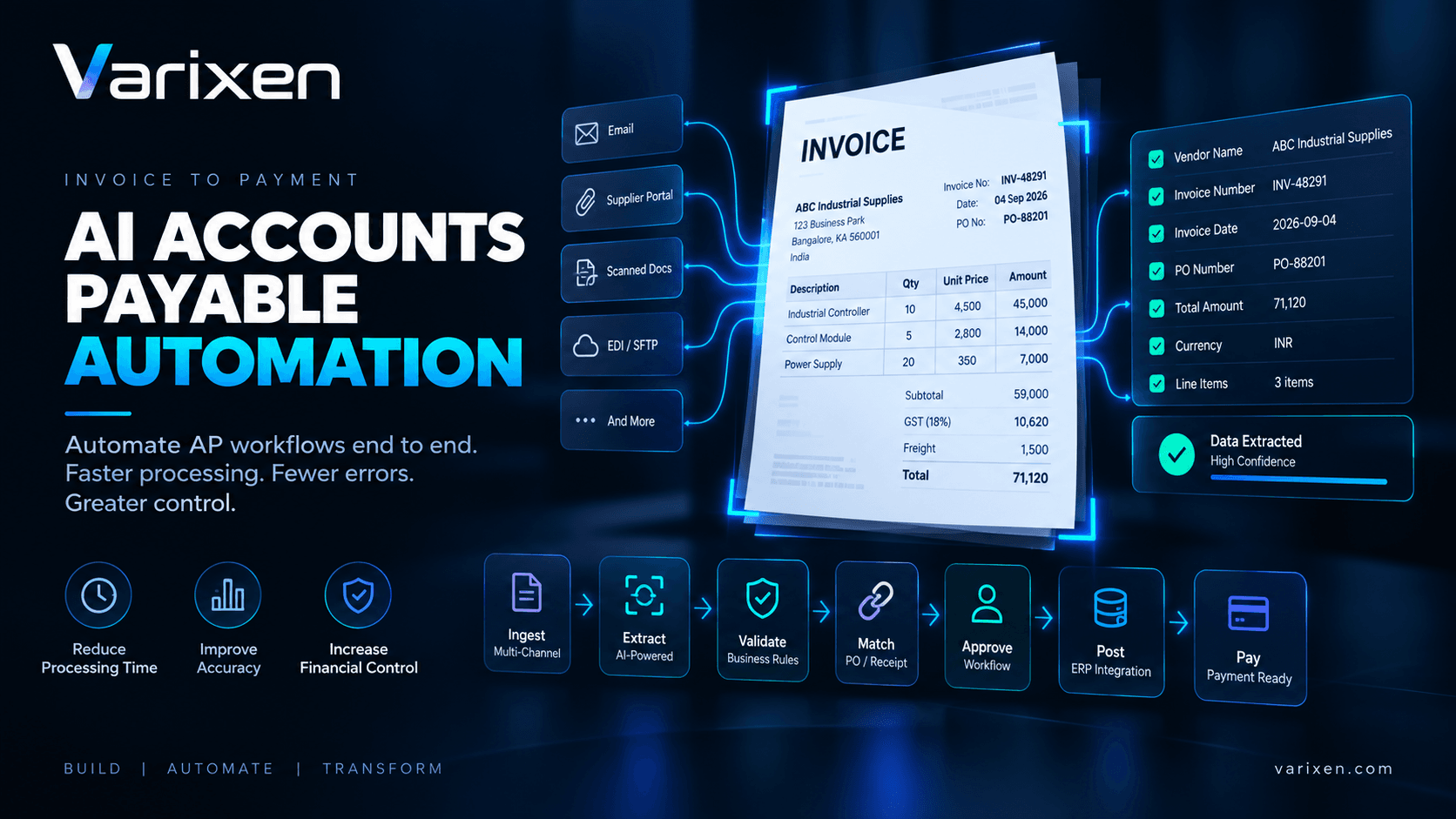
AI Accounts Payable Automation: How to Automate AP Workflows End to End
Accounts payable automation is often described as an invoice-processing problem.
It is not.
Invoice extraction is only one step inside a much larger financial workflow involving procurement, purchase orders, receiving records, approvals, accounting systems, vendors, and payment operations.
A finance team may successfully extract an invoice number, vendor name, tax amount, and total using AI. But if employees still have to manually verify purchase orders, reconcile receipts, route approvals, enter ERP records, investigate exceptions, and track payment status, the organization has automated only a fraction of the accounts payable process.
A more complete approach is:
Invoice Received
       ↓
Document Processing
       ↓
Data Extraction
       ↓
Validation
       ↓
PO / Receipt Matching
       ↓
Exception Detection
       ↓
Approval Workflow
       ↓
ERP Posting
       ↓
Payment Workflow
       ↓
Audit & Reporting
This is where AI accounts payable automation becomes substantially more valuable than standalone OCR or invoice data extraction.
What Is AI Accounts Payable Automation?
AI accounts payable automation uses artificial intelligence, document processing, workflow automation, business rules, enterprise integrations, and human-in-the-loop controls to automate repetitive AP activities across the invoice-to-payment lifecycle.
A mature AP automation platform can help organizations automate activities such as:
- Invoice ingestion
- Invoice classification
- Data extraction
- Vendor identification
- Purchase-order matching
- Goods-receipt matching
- Duplicate detection
- Tax validation
- GL coding
- Approval routing
- Exception management
- ERP synchronization
- Payment preparation
- Audit trail generation
- AP analytics
The important distinction is:
Invoice automation processes the document. AP automation processes the financial workflow.
That distinction determines the architecture, implementation strategy, and ultimately the business value.
1. Why Accounts Payable Is Still Highly Manual
Many AP departments operate across a fragmented set of systems.
A typical workflow may involve:
Supplier
   ↓
Email
   ↓
Invoice PDF
   ↓
AP Employee
   ↓
OCR / Manual Entry
   ↓
ERP
   ↓
Purchase Order
   ↓
Receiving System
   ↓
Manager Approval
   ↓
Finance Review
   ↓
Payment
The problem isn't necessarily that any individual step is difficult.
The problem is the number of handoffs.
Every handoff creates opportunities for:
- Data-entry errors
- Processing delays
- Missing documents
- Duplicate invoices
- Approval bottlenecks
- Incorrect coding
- Unmatched invoices
- Vendor communication overhead
- ERP synchronization failures
- Audit gaps
Varixen's enterprise automation methodology emphasizes mapping manual touchpoints and error-prone data paths before designing the automation architecture. ([Varixen][1])
2. Invoice Processing vs. AP Automation
These concepts are closely related but should not be treated as identical.
| Invoice Processing | Accounts Payable Automation |
|---|---|
| Reads invoices | Manages the AP workflow |
| Extracts fields | Validates transactions |
| Identifies line items | Matches PO and receiving data |
| Converts documents to data | Routes approvals |
| Focuses on document intelligence | Focuses on business process |
| Primarily input-oriented | End-to-end workflow |
| Usually stops at extraction | Continues through ERP/payment workflow |
For example:
An invoice extraction system might produce:
{
  "invoiceNumber": "INV-48291",
  "vendor": "ABC Industrial Supplies",
  "total": 71120
}
An AP automation system needs to determine:
Is ABC Industrial Supplies an approved vendor?
        ↓
Does INV-48291 already exist?
        ↓
Does the PO exist?
        ↓
Does the invoice match the PO?
        ↓
Were the goods received?
        ↓
Are price and quantity within tolerance?
        ↓
Does the transaction satisfy approval policy?
        ↓
Should a human review it?
        ↓
Can it be posted to the ERP?
That is a much larger problem.
3. The End-to-End AI Accounts Payable Workflow
A production-grade AP automation workflow can be organized into nine major stages.
1. Ingestion
      ↓
2. Classification
      ↓
3. Extraction
      ↓
4. Validation
      ↓
5. Matching
      ↓
6. Exception & Risk Evaluation
      ↓
7. Approval
      ↓
8. ERP Posting
      ↓
9. Payment & Audit
Each stage should have a clearly defined responsibility.
This makes the system easier to monitor, test, secure, and improve.
4. Stage 1 — Multi-Channel Invoice Ingestion
Invoices rarely arrive through a single channel.
Organizations may receive them through:
- AP email
- Supplier portals
- EDI
- SFTP
- Scanners
- Procurement platforms
- Cloud storage
- APIs
- Internal finance applications
A centralized ingestion layer can normalize these different sources.
Email ────────┐
Portal ───────┤
EDI ──────────┤
SFTP ─────────┤
Scanner ──────┤
API ──────────┤
              ↓
       Ingestion Gateway
              ↓
       Normalized Document
The ingestion layer can perform:
- File validation
- Malware scanning
- Metadata extraction
- Document identification
- Duplicate fingerprinting
- Storage
- Transaction ID generation
Why Idempotency Matters
Suppose a supplier sends the same invoice through both email and a supplier portal.
Without duplicate controls:
Email Invoice → Transaction A
Portal Invoice → Transaction B
The organization could potentially process the same financial obligation twice.
A stronger system creates a transaction fingerprint using information such as:
Vendor
+
Invoice Number
+
Invoice Date
+
Invoice Amount
+
Currency
+
PO Number
The system can then compare new transactions against existing records before processing continues.
5. Stage 2 — AI Document Classification
Not every document entering the AP workflow is an invoice.
It could be:
- Invoice
- Credit note
- Debit note
- Purchase order
- Receipt
- Statement
- Delivery document
- Tax document
- Supporting attachment
An AI classification layer can determine the document type before applying the appropriate extraction schema.
Incoming Document
       ↓
Document Classifier
       ↓
 ┌─────┼─────┬──────┐
Invoice Credit PO   Other
Classification confidence should also be captured.
For example:
Document Type: Invoice
Confidence: 97%
Low-confidence documents can be routed for review rather than being processed automatically.
This principle follows a broader Varixen approach of combining AI capabilities with explicit workflow controls rather than treating model output as the final business decision. Varixen's AI solutions architecture includes guardrails, validation layers, execution logs, and production monitoring. ([Varixen][2])
6. Stage 3 — Intelligent Invoice Data Extraction
Once a document is identified as an invoice, the extraction layer converts the document into structured financial information.
Typical fields include:
Invoice Header
Invoice Number
Invoice Date
Due Date
Currency
PO Number
Payment Terms
Vendor
Vendor Name
Vendor ID
Tax ID
Billing Address
Remittance Address
Line Items
SKU
Description
Quantity
Unit of Measure
Unit Price
Tax
Line Total
Financial Totals
Subtotal
Discount
Freight
Tax
Total
Amount Due
But production extraction should go beyond the extracted value.
Important fields should ideally maintain:
Value
Confidence
Source Page
Source Region
Extraction Model
Model Version
Timestamp
This makes the extracted information traceable.
For complex invoices containing tables, irregular layouts, or multiple visual structures, multimodal document intelligence can combine text and visual information rather than relying solely on OCR. Varixen's multimodal AI capability specifically covers complex document intelligence for charts, tables, diagrams, and body text. ([Varixen][3])
You can also read our previous technical deep dive on AI invoice processing architecture for the underlying document-processing architecture.
7. Stage 4 — Deterministic Financial Validation
This is one of the most important stages in the architecture.
AI can extract financial information.
It should not be the only mechanism determining whether that information is financially valid.
For example:
Quantity:       10
Unit Price:     ₹4,500
Line Total:     ₹45,000
The system can independently calculate:
10 × ₹4,500 = ₹45,000If the invoice says:
Line Total = ₹48,000the transaction should be flagged.
Validation Rules
A validation engine can check:
Arithmetic
Line totals
Subtotal
Tax
Discount
Freight
Grand total
Vendor
Vendor exists?
Vendor active?
Tax ID valid?
Vendor authorized?
Tax
Tax code valid?
Tax rate valid?
Tax calculation correct?
Policy
Approval threshold exceeded?
Cost center valid?
Expense category permitted?
This produces a critical separation:
AI
↓
Understand and Extract
Rules Engine ↓ Validate
Workflow Engine ↓ Route
Human
↓
Govern Exceptions
`
That separation is fundamental to reliable finance automation.
8. Stage 5 — 2-Way and 3-Way Matching
This is where AP automation starts becoming a genuine financial workflow.
2-Way Matching
The system compares:
Purchase Order
       ↕
    Invoice
Typical comparison fields include:
- Vendor
- PO number
- Product
- Quantity
- Unit price
- Currency
- Total
For example:
PO:Product: Industrial Controller
Quantity: 100
Unit Price: ₹4,500
`
Invoice:
Product: Industrial Controller
Quantity: 100
Unit Price: ₹4,500
Result:
MATCH9. 3-Way Matching
For many procurement-driven organizations, the workflow becomes:
Purchase Order
                  /     \
                 /       \
                ↓         ↓
           Invoice ←→ Goods Receipt
The system compares:
Purchase Order
What was authorized?
Goods Receipt
What was actually received?
Invoice
What is the supplier charging?
Consider:
PO Quantity:       100
Received Quantity: 100
Invoice Quantity:  100
Result:
MATCHNow consider:
PO Quantity:       100
Received Quantity: 80
Invoice Quantity:  100
The invoice should not simply pass because the extraction was accurate.
There is a business exception:
Invoice Quantity > Received QuantityThe transaction should be routed according to the organization's tolerance and approval policies.
Varixen's finance and procurement architecture explicitly positions AP workflows around invoice OCR, 3-way matching, and ERP synchronization. ([Varixen][4])
10. Stage 6 — Exception Management
A good automation system is not one that never produces exceptions.
It is one that handles exceptions intelligently.
Common AP exceptions include:
| Exception | Example |
|---|---|
| Low extraction confidence | Invoice number unclear |
| Missing PO | Invoice has no purchase order |
| Price variance | Invoice price differs from PO |
| Quantity variance | Invoice exceeds received quantity |
| Duplicate | Same invoice already exists |
| Vendor mismatch | Vendor differs from PO |
| Tax discrepancy | Tax calculation doesn't reconcile |
| Approval violation | Amount exceeds approval limit |
| Bank change | Supplier banking information changed |
Instead of sending every invoice to an employee:
10,000 invoices
       ↓
100% manual review
the system can create:
10,000 invoices
       ↓
AI + Rules + Matching
       ↓
 ┌─────────────┬──────────────┐
 │             │              │
Low Risk    Exceptions     High Risk
 │             │              │
 ↓             ↓              ↓
Auto        Review         Mandatory
Process     Queue          Approval
The human workforce then focuses on transactions requiring judgment.
11. Human-in-the-Loop AP Automation
Human involvement should be designed into the system rather than treated as a failure state.
A finance reviewer should be able to see:
Invoice
   +
Extracted Data
   +
Confidence
   +
Validation Results
   +
PO
   +
Receiving Record
   +
Exception Reason
A useful review interface could show:
┌──────────────────────┬─────────────────────────────┐
│                      │                             │
│   Invoice Document   │      Transaction Data      │
│                      │                             │
│   Page 1 / 2         │ Vendor: ABC Supplies       │
│                      │ Invoice: INV-48291         │
│   [Document]         │ PO: PO-88201              │
│                      │ Total: ₹71,120             │
│                      │                             │
│                      │ Exception: Price Variance  │
│                      │                             │
└──────────────────────┴─────────────────────────────┘
The reviewer can then:
Approve
Reject
Correct
Request clarification
Escalate
The correction itself can become useful evaluation data for future system improvement.
12. Stage 7 — Intelligent Approval Routing
Not every invoice requires the same approval path.
A simple policy could be:
Invoice < ₹10,000
        ↓
Department Approval
while:
Invoice ₹10,000–₹100,000
        ↓
Manager Approval
and:
Invoice > ₹100,000
        ↓
Finance + Executive Approval
But amount alone is insufficient.
A better risk model can consider:
Invoice Amount
+
Vendor Risk
+
Extraction Confidence
+
PO Match
+
Receipt Match
+
Policy Exceptions
+
Historical Behavior
This creates risk-aware routing.
13. Stage 8 — ERP Integration
AP automation creates limited value if employees still have to manually re-enter approved invoices into the ERP.
The final workflow should therefore connect the automation layer with the organization's financial systems.
Depending on the environment, this may include:
- SAP
- Oracle NetSuite
- Microsoft Dynamics
- Workday
- QuickBooks
- Custom ERP systems
Varixen's enterprise automation architecture includes connector and integration layers with secure API middleware, authentication vaults, retry queues, validation schemas, and production telemetry. ([Varixen][1])
A simplified architecture looks like:
AP AI Platform
                       │
          ┌────────────┼────────────┐
          ↓            ↓            ↓
        SAP        NetSuite     Dynamics
          │            │            │
          └────────────┼────────────┘
                       ↓
                 General Ledger
Important Integration Requirements
Enterprise ERP integration should account for:
- Authentication
- Authorization
- API failures
- Retries
- Idempotency
- Rate limits
- Transaction status
- Error recovery
- Audit trails
- Data synchronization
A failed ERP API request should not cause an approved invoice to disappear from the workflow.
The transaction should move into a recoverable state.
14. Stage 9 — Payment and Audit Workflow
Once an invoice is approved and posted, the workflow can continue into payment preparation.
The system can maintain:
Invoice Received
       ↓
Extracted
       ↓
Validated
       ↓
Matched
       ↓
Approved
       ↓
Posted
       ↓
Payment Ready
       ↓
Paid
Each transition should be auditable.
A useful audit record might contain:
Transaction ID
Document ID
Vendor
Invoice Number
Extraction Model
Extraction Version
Validation Results
Matching Results
Exception History
Reviewer
Approval Timestamp
ERP Transaction ID
Payment Status
This becomes particularly important when finance teams need to answer:
Why was this invoice approved?
A production system should be able to reconstruct the decision path.
15. Where AI Agents Fit Into AP Automation
AI agents can add value after the foundational automation pipeline is established.
Consider a price discrepancy:
PO Price:       ₹5,000
Invoice Price:  ₹5,400
Variance:       8%
Instead of immediately assigning the task to an AP employee, an exception investigation agent could gather relevant context.
Exception Agent
      ↓
Retrieve Invoice
      ↓
Retrieve PO
      ↓
Retrieve Contract
      ↓
Check Previous Invoices
      ↓
Check Pricing History
      ↓
Identify Potential Reason
      ↓
Prepare Investigation Summary
      ↓
Human Decision
The agent should not automatically override financial controls.
Its role can be to reduce the investigation effort surrounding those controls.
Varixen's autonomous AI agent capability is designed for multi-step workflows, tool usage, orchestration, and safety guardrails. ([Varixen][5])
A mature architecture therefore looks like:
AI Extraction
      ↓
Rules Validation
      ↓
Matching
      ↓
Agentic Investigation
      ↓
Human Approval
      ↓
ERP Execution
16. Duplicate Invoice Detection
Duplicate invoices can occur because of:
- Multiple submission channels
- Resubmission after delayed responses
- Formatting changes
- Vendor mistakes
- Slightly modified invoice documents
A robust duplicate detection system should not rely only on document hashes.
It can combine:
Exact Match
+
Fuzzy Match
+
Vendor
+
Invoice Number
+
Date
+
Amount
+
PO
+
Currency
For example:
INV-48291
₹71,120
ABC Supplies
PO-88201
and:
INV-48291
₹71,120
ABC Industrial Supplies
PO-88201
should potentially be treated as the same financial transaction even if the vendor name differs slightly.
This is where entity resolution and business context become important.
17. Security and Governance
Accounts payable contains commercially sensitive information.
Depending on the organization, invoices can expose:
- Vendor information
- Pricing
- Tax information
- Banking information
- Employee information
- Commercial contracts
- Purchase details
Security should therefore be designed into the architecture.
Key controls include:
Access Control
Use role-based permissions for:
AP Clerk
Finance Manager
Controller
Auditor
Administrator
Encryption
Protect:
Documents
Extracted Data
API Communication
Credentials
Stored Records
Audit Logging
Record:
Who viewed?
Who changed?
Who approved?
What changed?
When?
Why?
Tenant Isolation
For multi-tenant platforms, customer data should remain logically isolated.
Model Governance
Organizations should understand:
Which model processed the document?
Where was the document processed?
What information was sent to the model?
How long was it retained?
Which version produced the result?
Varixen's AI architecture emphasizes enterprise governance, PII protection, audit logging, RBAC, and controlled deployment environments. ([Varixen][2])
18. Observability and MLOps
An AP automation system should not be considered finished when it goes live.
Invoice populations change.
Vendors change templates.
ERP systems change.
Business policies change.
AI models change.
Therefore, production monitoring should cover both the software system and the AI system.
Useful metrics include:
Invoice Processing Volume
Extraction Accuracy
Line-Item Accuracy
Exception Rate
Human Correction Rate
Straight-Through Processing Rate
Average Processing Time
ERP Failure Rate
Duplicate Detection Rate
Cost Per Invoice
For the AI layer:
Model Version
Confidence Distribution
Data Drift
Model Drift
Latency
Failure Rate
Token / Inference Cost
Varixen's MLOps capability includes automated ML pipelines, model monitoring, drift detection, CI/CD, audit lineage, and production governance. ([Varixen][6])
19. Measuring AP Automation ROI
Organizations should avoid measuring success only through:
"How many invoices were processed?"
The more useful question is:
How much AP work can be completed reliably with less manual intervention?
Important KPIs include:
Straight-Through Processing Rate
Invoices completed without manual intervention
─────────────────────────────────────────────
Total invoices processed
Exception Rate
Invoices requiring human intervention
──────────────────────────────────────────
Total invoices
Invoice Processing Cycle Time
Measure:
Invoice Received
        ↓
Invoice Approved
        ↓
ERP Posted
Human Touch Time
Measure the actual employee time spent per invoice.
First-Pass Match Rate
Percentage of invoices that successfully pass matching without intervention.
Cost Per Invoice
Consider:
Labor
+
AI inference
+
OCR
+
Infrastructure
+
Storage
+
Integration
+
Exception handling
Duplicate Prevention
Track potentially prevented duplicate transactions.
Approval Time
Measure the time invoices spend waiting for approval.
These metrics provide a much clearer view of whether AP automation is actually improving the finance function.
20. A Practical Implementation Roadmap
Organizations should not attempt to automate the entire AP function on day one.
A phased approach is safer.
Phase 1 — AP Process Discovery
Document:
- Invoice volume
- Invoice sources
- Vendor count
- ERP
- Current approval process
- Matching process
- Exception types
- Average processing time
- Manual touchpoints
Create a baseline before introducing automation.
Phase 2 — Invoice Intelligence
Start with:
Ingestion
   ↓
Classification
   ↓
Extraction
   ↓
Human Review
The objective is to establish extraction quality and understand real-world document variability.
Phase 3 — Validation
Add:
Arithmetic Validation
Vendor Validation
Tax Validation
Duplicate Detection
Policy Validation
Now the system can determine whether extracted data is internally consistent.
Phase 4 — Matching
Introduce:
2-Way Matching
Invoice ↔ PO
Then:
3-Way Matching
Invoice ↔ PO ↔ Receipt
Phase 5 — Workflow Automation
Introduce risk-based routing:
Low Risk
   ↓
Automatic Processing
Medium Risk ↓ Human Review
High Risk
↓
Mandatory Approval
`
Phase 6 — ERP Integration
Connect validated transactions to the organization's ERP.
At this stage, focus heavily on:
- Idempotency
- Error recovery
- API reliability
- Authentication
- Auditability
- Transaction state
Phase 7 — Optimization
Once sufficient production data exists:
Production Data
      ↓
Error Analysis
      ↓
Human Corrections
      ↓
Model Evaluation
      ↓
Workflow Optimization
      ↓
Production Monitoring
This creates a continuously improving AP automation system.
21. Common AP Automation Mistakes
Mistake 1: Automating OCR Instead of AP
Reading invoices faster doesn't necessarily eliminate AP work.
The workflow around the invoice must also be addressed.
Mistake 2: Letting AI Make Every Financial Decision
AI should support understanding and reasoning.
Financial controls should remain explicit and auditable.
Mistake 3: Ignoring Purchase Orders and Receipts
Invoice extraction without reconciliation can leave significant AP controls manual.
Mistake 4: Sending Every Invoice to Human Review
That defeats much of the purpose of automation.
Human review should focus on exceptions and decisions requiring judgment.
Mistake 5: Automating ERP Posting Too Early
Financial automation should be introduced progressively.
A safer progression is:
Extract
→ Validate
→ Review
→ Match
→ Controlled Automation
→ ERP Posting
Mistake 6: No Recovery Strategy
ERP failures, API failures, model failures, and integration errors will occur.
Transactions need recoverable states and retry mechanisms.
Mistake 7: Measuring Only Extraction Accuracy
A system can extract invoice fields accurately while still failing to deliver AP automation.
Measure business outcomes:
Cycle Time
Exception Rate
Human Touch Time
STP Rate
Match Rate
Cost Per Invoice
22. The Future of AI Accounts Payable
The evolution of AP automation can be viewed as four stages.
Stage 1 — Digitization
Paper → Digital DocumentStage 2 — Extraction
Document → Structured DataStage 3 — Workflow Automation
Structured Data
      ↓
Validation
      ↓
Matching
      ↓
Approval
      ↓
ERP
Stage 4 — Intelligent Finance Operations
Business Event
      ↓
AI Understanding
      ↓
Automated Investigation
      ↓
Risk Evaluation
      ↓
Human Governance
      ↓
System Execution
      ↓
Continuous Learning
The opportunity is therefore much larger than invoice OCR.
AP can become one component of an intelligent finance operating layer covering:
- Accounts payable
- Reconciliation
- General ledger automation
- Financial close
- Cash-flow intelligence
- Anomaly detection
- Vendor intelligence
- Financial reporting
Varixen's Finance & Accounting AI offering positions invoice parsing alongside GL reconciliation, cash-flow forecasting, and audit controls as part of a broader finance automation capability. ([Varixen][7])
Frequently Asked Questions
What is AI accounts payable automation?
AI accounts payable automation combines AI document processing, business rules, workflow orchestration, matching, human review, and ERP integration to automate the invoice-to-payment workflow.
Is AP automation the same as invoice processing?
No.
Invoice processing focuses primarily on receiving, reading, extracting, and validating invoice information.
AP automation extends the workflow into matching, approvals, ERP posting, payment preparation, exception management, and auditability.
Can AI automatically approve invoices?
It can be designed to automatically process low-risk invoices when predefined conditions are satisfied.
High-risk or ambiguous transactions should generally remain subject to appropriate human approval and organizational controls.
What is 3-way matching?
3-way matching compares:
Purchase Order + Goods Receipt + Invoice
to determine whether the invoiced transaction corresponds with what was ordered and received.
Can AI accounts payable automation integrate with an ERP?
Yes.
The architecture can use APIs, middleware, integration platforms, or other supported enterprise interfaces to synchronize validated transactions with financial systems.
What happens when AI is uncertain?
A mature system should route uncertain transactions into an exception queue rather than forcing an automated decision.
This is where human-in-the-loop design becomes important.
How do you measure AP automation success?
Useful metrics include:
- Straight-through processing rate
- Exception rate
- Invoice cycle time
- Human touch time
- First-pass match rate
- Approval time
- Cost per invoice
- ERP failure rate
- Duplicate detection rate
Conclusion
The most valuable AP automation systems do not simply make invoices easier to read.
They make the entire financial workflow easier to operate.
A mature architecture connects:
Invoice
   ↓
AI Document Intelligence
   ↓
Structured Financial Data
   ↓
Validation
   ↓
PO / Receipt Matching
   ↓
Risk Evaluation
   ↓
Human Exception Handling
   ↓
Approval
   ↓
ERP
   ↓
Payment
   ↓
Audit & Continuous Optimization
The guiding principle is straightforward:
Automate the predictable. Validate the critical. Escalate the uncertain.
That is the foundation for moving from basic invoice processing toward intelligent accounts payable automation.
For organizations evaluating this transformation, the logical next step is to assess the current AP workflow, identify the highest-volume manual touchpoints, establish baseline KPIs, and determine which parts of the process can safely move toward straight-through processing.
Continue the Finance AI Cluster
Explore Varixen Finance & Accounting AI for the broader finance automation capability.
Read AI Invoice Processing Architecture for the underlying enterprise invoice-processing architecture.
For the document intelligence layer, explore Varixen Multi-Modal AI Systems.
For workflow orchestration and enterprise integrations, see Varixen Enterprise Automation & Workflow Integration.
For production AI monitoring and governance, explore Varixen Production MLOps & Governance.
| [1]: https://www.varixen.com/services/enterprise-automation?utm_source=chatgpt.com "Enterprise Automation & Workflow Integration Services | Varixen" | |
|---|---|---|
| [2]: https://www.varixen.com/services/ai-solutions?utm_source=chatgpt.com "Enterprise AI Solutions & Intelligent Systems Engineering | Varixen" | |
| [3]: https://www.varixen.com/services/multi-modal-ai?utm_source=chatgpt.com "Enterprise Multi-Modal AI Development | Vision & Audio | Varixen" |
| [4]: https://www.varixen.com/departments/procurement?utm_source=chatgpt.com "AI Procurement Solutions & Strategic Vendor Spend Automation | Varixen" | |
| [5]: https://www.varixen.com/services/ai-agents?utm_source=chatgpt.com "Enterprise AI Agents Development | Autonomous Workflows | Varixen" |
| [6]: https://www.varixen.com/services/mlops?utm_source=chatgpt.com "Enterprise MLOps & AI Governance Services | Varixen" | |
| [7]: https://www.varixen.com/departments?utm_source=chatgpt.com "Departments We Support | Enterprise AI Automation | Varixen" |